
In the realm of digital design, the technical foundation of an image dictates how it behaves, scales, and renders across various media. While the average user might only distinguish between “clear” and “blurry” files, professionals understand that the underlying architecture of an image file is the primary determinant of quality. At the heart of this distinction lies the vector graphic. Unlike their raster-based counterparts, which are composed of a rigid grid of colored pixels, vector graphics are mathematical equations transformed into visual art. This article explores the mechanics, advantages, and practical applications of vector technology in the modern design landscape.

The Mathematical Foundation: How Vectors Function
To understand vector graphics, one must look beyond the screen and into the coordinate geometry that powers them. Every element in a vector image—a curve, a line, a polygon, or a point—is defined by a mathematical path.
Nodes, Paths, and Bezier Curves
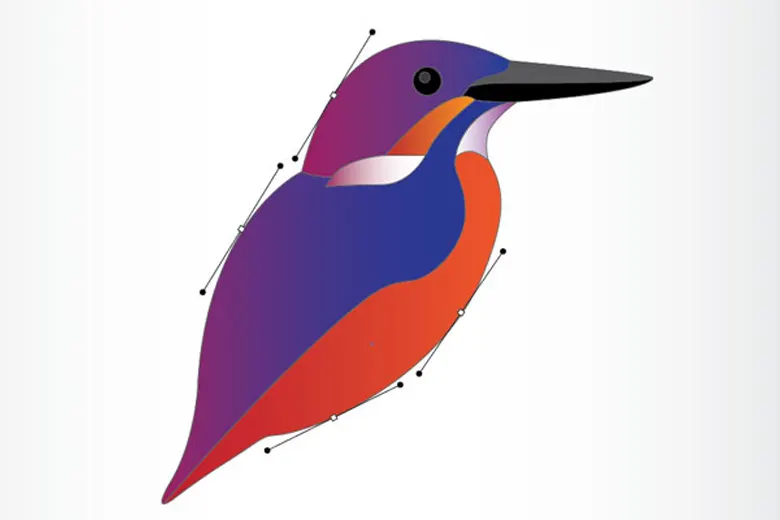
A vector image is constructed using geometric primitives. A simple circle is not a collection of pixels in a specific order, but a formula that tells the computer: “Draw a path with a specific radius, stroke width, and fill color, centered at this exact X and Y coordinate.” These points are called nodes or anchors. By manipulating the handles attached to these nodes, designers create Bezier curves, which allow for smooth, fluid shapes that can be mathematically calculated to maintain their integrity regardless of the zoom level.
Resolution Independence
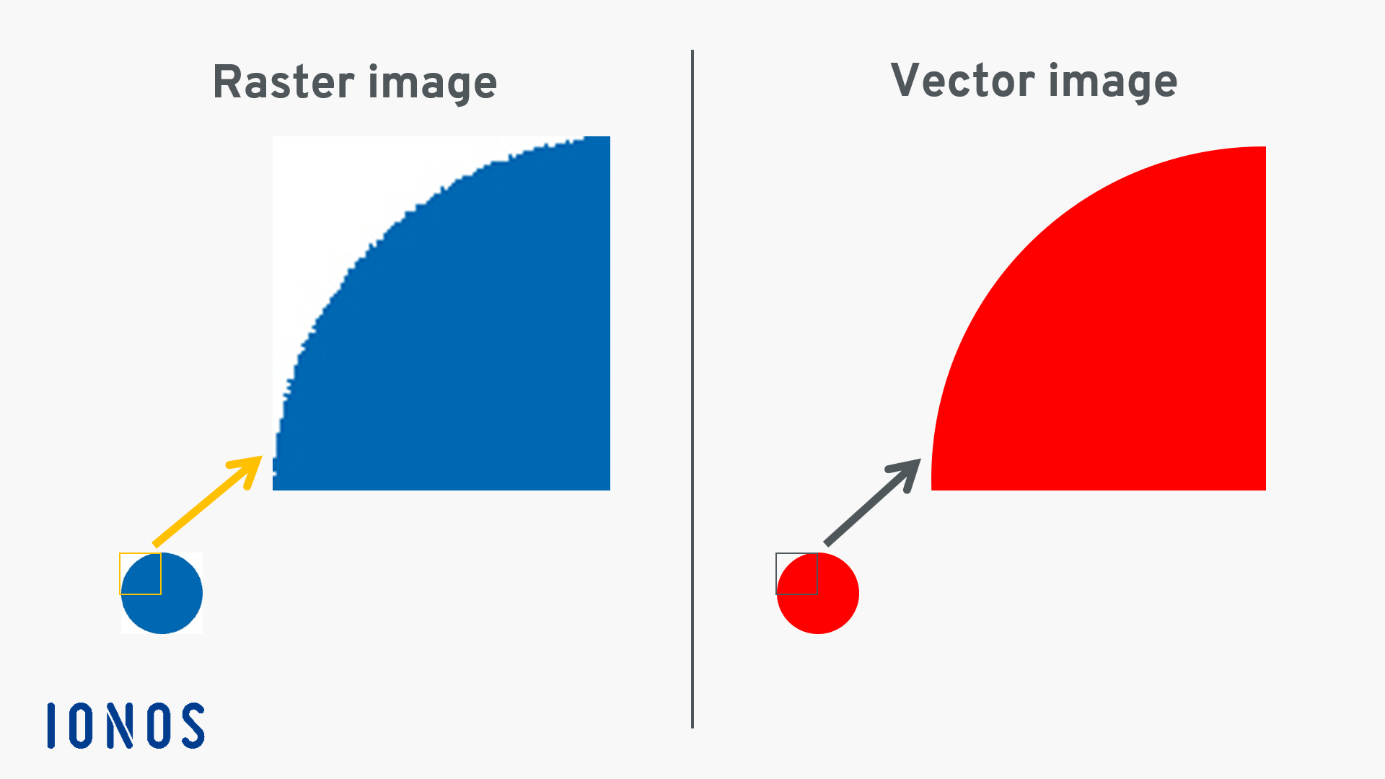
The defining characteristic of a vector graphic is its resolution independence. Because the image is defined by math rather than a fixed grid of pixels, it can be scaled infinitely. Whether you are printing a vector logo on a business card or enlarging it to fit the side of a skyscraper, the quality remains identical. The software simply recalculates the path equations to match the output size, ensuring that edges remain razor-sharp and colors stay crisp. This makes vectors the gold standard for branding, signage, and technical illustration.
Comparing Vectors and Raster Images
The digital world is divided between two primary image formats: vectors and rasters. While both serve essential purposes, understanding the trade-offs between them is vital for any designer or project manager.
The Limitations of Raster Graphics
Raster images, such as JPEGs, PNGs, and GIFs, are composed of a fixed grid of pixels. Each pixel contains specific color information. When you zoom in on a raster image, you eventually reach the “pixel wall,” where the computer can no longer simulate detail, resulting in a blurry or “pixelated” appearance. Raster graphics are ideal for complex photography, where every subtle gradient and texture needs to be captured, but they are inherently fragile when it comes to resizing.
When to Choose Vector
Vectors are the superior choice for any graphic that requires clean lines, flat colors, and geometric precision. Logos, icons, typography, and architectural blueprints are almost exclusively rendered in vector format. Because they store information as equations rather than pixel data, their file sizes are often significantly smaller than high-resolution raster files, provided the illustration does not contain thousands of complex, overlapping paths.
Converting Between Formats
While it is simple to “rasterize” a vector—converting a math-based image into a pixel-based one—the reverse process is significantly more complex. Turning a photograph into a vector requires “vector tracing,” a process where software or designers attempt to approximate pixel color clusters with solid shapes. While powerful tools exist to automate this, the result is rarely as clean as a file created as a vector from the outset.
Common Vector File Formats and Software
Professional workflows rely on industry-standard formats and software environments to create, store, and edit vector data. Familiarity with these tools is essential for maintaining brand consistency and workflow efficiency.
Standard Industry Formats
- AI (Adobe Illustrator): The proprietary format for Adobe’s vector software, holding the most robust data for complex editing.
- SVG (Scalable Vector Graphics): An XML-based format designed specifically for the web. Because SVGs are essentially code, they are incredibly lightweight and can be animated or manipulated via CSS and JavaScript.
- EPS (Encapsulated PostScript): A legacy format still widely used in the printing industry for its compatibility across various software platforms.
- PDF (Portable Document Format): While often used for text documents, PDFs are capable of holding vector data, making them ideal for high-quality printing.
The Software Ecosystem
The creation of vector art is dominated by a few key players. Adobe Illustrator remains the industry benchmark, offering a deep suite of tools for path manipulation and layer management. Affinity Designer has emerged as a formidable competitor, offering a modern, performant environment for vector illustration without the subscription model. For web-based tasks and UI/UX design, Figma has become the standard, allowing teams to collaborate on vector-based interface elements in real-time.
Strategic Applications in Modern Design
Vector graphics are not merely a technical choice; they are a strategic asset in brand management and digital experience. By leveraging the versatility of vectors, organizations ensure their visual identity remains cohesive across every touchpoint.
Brand Identity and Scalability
Consistency is the cornerstone of a strong brand. A company’s logo must appear with equal clarity on a social media profile picture, a promotional pen, and a large-scale event banner. If a logo is raster-based, the brand risks pixelation and degradation as it scales across these disparate media. Using vector formats for logos and core brand assets is a professional necessity, ensuring the integrity of the corporate identity remains uncompromised regardless of the physical or digital application.
Web Performance and Interactivity
In the era of mobile-first web design, performance is everything. SVGs provide a major advantage here; they are often smaller in file size than equivalent raster images and can be scaled to fit any screen size without additional server requests for high-resolution assets. Furthermore, because an SVG is essentially text, it is searchable by search engines and can be manipulated by code. A designer can write a script to change the color of a vector icon on hover, or animate a complex illustration based on user interactions, creating a dynamic, engaging user experience that raster images simply cannot replicate.
Technical and Precision Illustration
Beyond branding, vectors are the backbone of technical fields. Engineers, architects, and product designers rely on vector software to draft schematics that must be accurate to the millimeter. In these sectors, the ability to define paths with exact numerical precision is not just an aesthetic choice, but a functional requirement. The ability to measure, align, and distribute elements mathematically ensures that complex diagrams remain readable and accurate, whether they are printed in a manual or viewed on a digital tablet.
Conclusion
The vector graphic stands as a testament to the power of mathematics in design. By prioritizing paths, nodes, and scalable geometry, vector technology provides a level of durability and flexibility that raster images cannot emulate. Whether for the purpose of creating a responsive website, designing a scalable corporate logo, or drafting precise technical diagrams, the vector format remains an indispensable tool in the designer’s arsenal. By understanding how these images function, professionals can create assets that are not only visually compelling but also robust, performant, and future-proof. In a digital landscape defined by an ever-expanding array of screen sizes and resolutions, the mathematical certainty of the vector graphic is the most reliable path to visual excellence.
aViewFromTheCave is a participant in the Amazon Services LLC Associates Program, an affiliate advertising program designed to provide a means for sites to earn advertising fees by advertising and linking to Amazon.com. Amazon, the Amazon logo, AmazonSupply, and the AmazonSupply logo are trademarks of Amazon.com, Inc. or its affiliates. As an Amazon Associate we earn affiliate commissions from qualifying purchases.